GodotGAS: Core Concepts
Welcome to GodotGAS! This framework brings the data-driven power, flexibility, and decoupled architecture of Unreal Engine’s Gameplay Ability System (GAS) natively into Godot 4.
If you are building an RPG, MOBA, or any game with complex character stats, buffs, debuffs, and interlocking combat mechanics, hardcoding that logic into your CharacterBody3D quickly becomes a tangled mess. GodotGAS solves this by moving your combat logic out of your character scripts and into modular, reusable components and data resources.
To use the framework effectively, you need to understand its four central pillars.
1. The Ability System Component (ASC)
The Brain of the Operation.
The AbilitySystemComponent (ASC) is a custom Godot Node that you attach to any entity in your game that needs to interact with the combat system—players, enemies, destructible barrels, or even a localized healing zone.
The ASC doesn’t hold hardcoded logic for how to swing a sword or cast a fireball. Instead, it acts purely as a State Manager. It tracks:
- What Abilities the entity currently possesses.
- What Attributes (stats) the entity has.
- What Gameplay Effects (buffs/debuffs) are currently applied to it.
- What Tags the entity is currently tagged with (e.g.,
Status.Stunned).
When an entity wants to do anything in the combat loop, it asks its ASC to execute it.
2. Attribute Sets
The Stats.
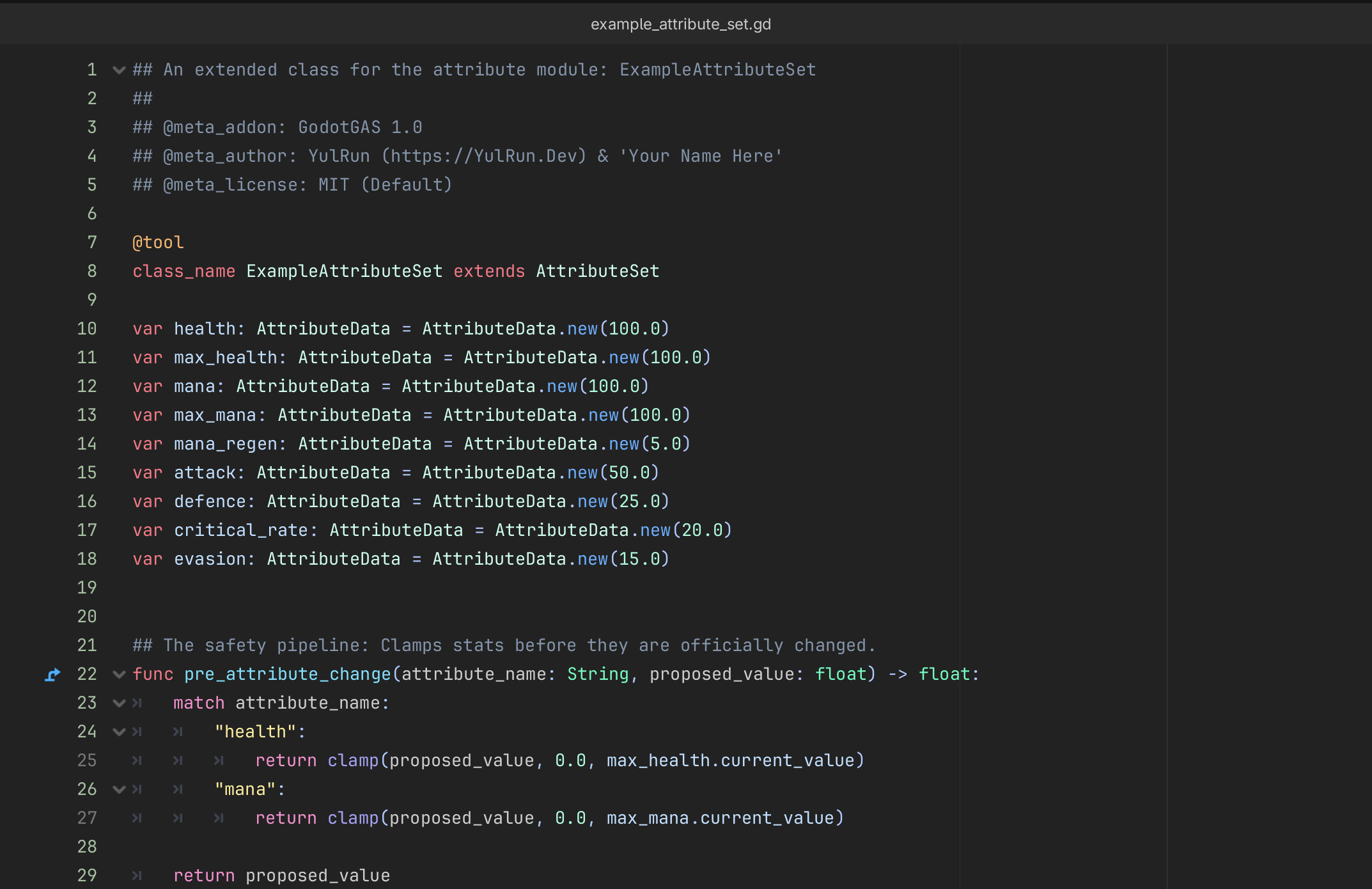
Instead of storing variables like var health = 100 directly on your player script, GodotGAS uses AttributeSet resources. An Attribute is a float value wrapped in a container that tracks both its Base Value (your naked, permanent stat) and its Current Value (your temporary stat modified by active buffs or debuffs).
By keeping stats in an AttributeSet, the ASC can easily intercept mathematical changes, allowing you to clamp values (e.g., ensuring Health never drops below 0 or exceeds Max Health).
3. Gameplay Effects
The Math & State.
A GameplayEffect is a Godot Resource (.tres) created by a Game Designer to define a buff, debuff, or instant change in the game. Effects are the only things allowed to change an Attribute. If you want to heal a player, you don’t write player.health += 50. You tell the ASC to apply a Heal Gameplay Effect. Effects handle:
- Duration Policy: Is this an
Instantheal? A 5-secondDurationpoison? AnInfinitering of strength? - Modifiers: Simple math operations (Add, Multiply, Divide, Override).
- Execution Calculations: Custom GDScript intercepts to perform dynamic math or alter the rules of the effect before it applies.
- Tags: Automatically granting tags to the target while the effect is active (e.g., granting
Status.Burningfor 5 seconds).
The Spec (The Mutable Payload)
While the GameplayEffect is the static blueprint on your hard drive, a GameplayEffectSpec is the live, mutable instance of that effect used during combat.
When an ability applies an effect, it wraps it in a Spec. The Spec takes a snapshot of the base duration, period, and modifier magnitudes. The Spec acts as the Source of Truth during execution, allowing Execution Calculations to dynamically alter cooldown times or modifier magnitudes on the fly without permanently altering the base Resource.
4. Gameplay Abilities
The Logic & Actions.
A GameplayAbility is the actual logic that dictates how something happens. This is a Node where you script your visual and mechanical flow. For example, a Fireball ability might:
- Pay the Mana cost (via a Gameplay Effect).
- Play a casting animation.
- Spawn a projectile.
- Apply a Damage Gameplay Effect to whoever the projectile hits.
Because abilities are standalone nodes, they are highly modular. You can easily grant the exact same Fireball ability to a Player and an Enemy AI without rewriting a single line of code.
The Decoupling of Tags and Cues
One of the most powerful features of GodotGAS is how it handles the “narrative” of combat using Tags and Cues.
Gameplay Tags
Tags are strictly validated StringNames (e.g., Event.Damage.Critical or Status.Silenced) managed by a global registry. They are used for Gatekeeping. An ability can look at an ASC and say, “I am blocked from activating if you have the Status.Silenced tag.” ### Gameplay Cues Cues are the Visuals and Audio. In traditional game dev, your ability script might manually instantiate a particle system and play a sound. In GodotGAS, you decouple this completely.
Your ability simply tells the global GameplayCueManager: “Execute the Cue.SFX.Fireball.Impact tag right here.” The manager looks up what .tscn is mapped to that tag, pulls it from a highly optimized Object Pool, and plays it. This means your mathematical combat logic never has to worry about loading, spawning, or deleting heavy visual nodes.